How to preview a certificate in JumpLMS
Last updated on
You can preview a JumpLMS certificate before assigning it to a course or issuing it to Learners.
Previewing a certificate downloads a sample PDF using generic data, so you can check the layout, text, formatting, and background image.
How to preview a certificate
-
Click on the Settings tab.
-
Click on the Certificates tab.
-
Search for the certificate you want to preview, or find it in the certificate list.
-
Open the certificate options and click Preview.
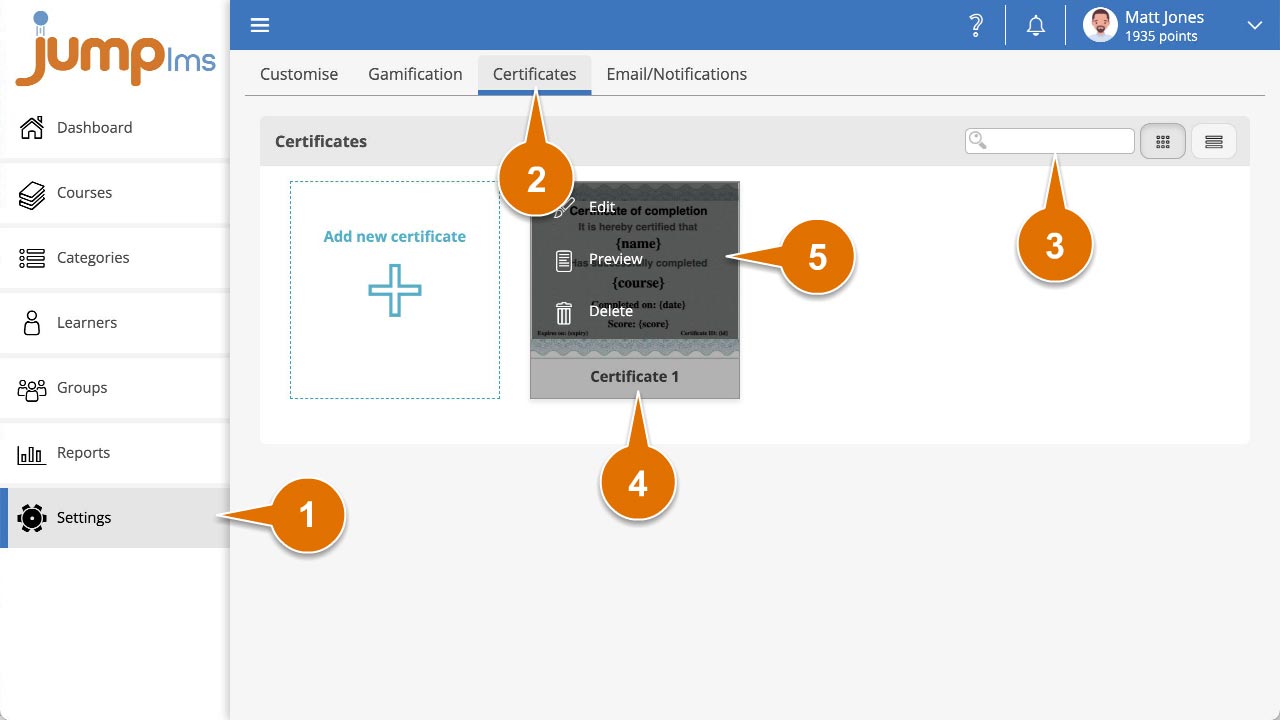
A sample PDF of your certificate will download, populated with generic example data.
Did this article help?
Can't find what you're looking for?
Contact the JumpLMS team and we’ll help you find the right answer.
Contact the JumpLMS team and we’ll help you find the right answer.