How to customise your default gamification points in JumpLMS
Last updated on
You can set default gamification point values for your JumpLMS portal.
These default values are applied to your courses automatically, unless you choose to customise the points for an individual course.
How to customise your default gamification points
-
Click on the Settings tab.
-
Click the Gamification tab.
-
Switch on Enable gamification points and leaderboards.
-
Tick each gamification trigger you want to activate.
-
Enter the point value you want to assign to each trigger.
-
Click Save changes.
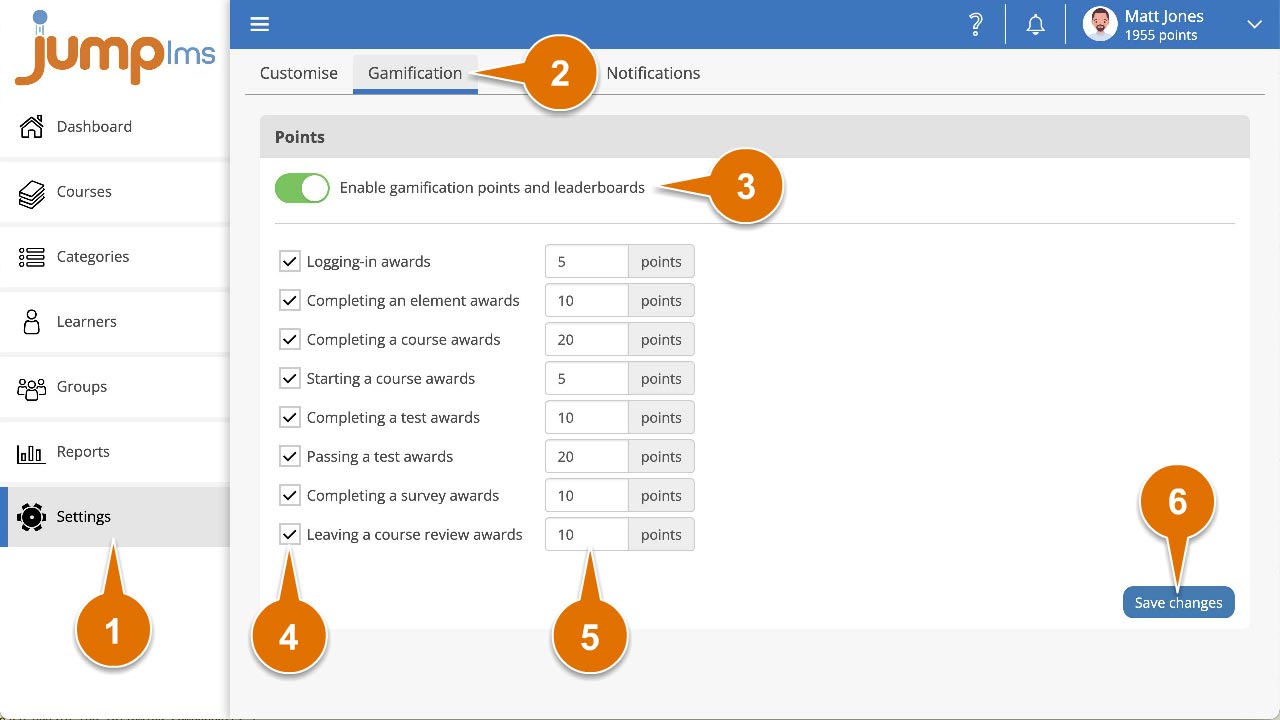
Your default gamification points have now been applied to your portal.
Did this article help?
Can't find what you're looking for?
Contact the JumpLMS team and we’ll help you find the right answer.
Contact the JumpLMS team and we’ll help you find the right answer.