How to add a custom Learner profile field in JumpLMS
Last updated on
JumpLMS includes standard Learner profile fields such as name, username, email address and telephone number.
If you need to store extra information about your Learners, you can add custom profile fields. These fields appear as custom columns in the Learners table and as additional fields when you add or edit a Learner profile.
How to add a custom Learner profile field
-
Click on the Learners tab.
-
Click Add a custom column.
-
Enter a title for the new custom field.
-
Click Add column.
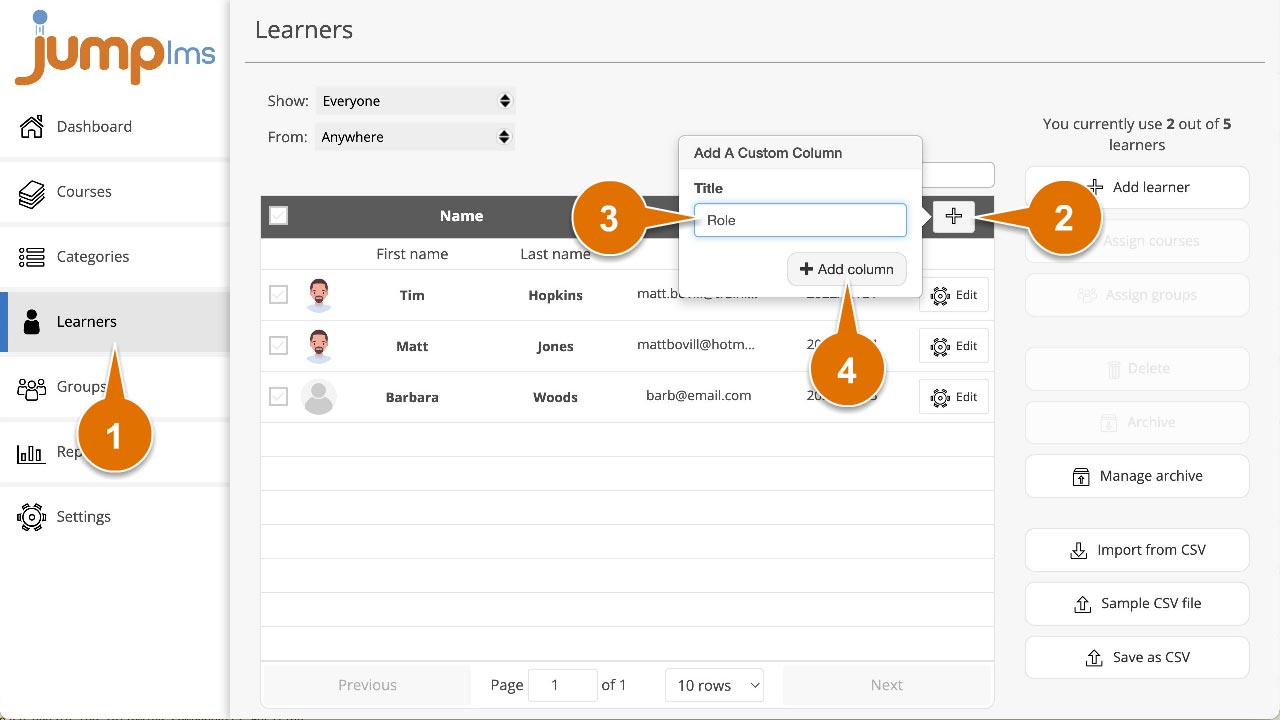
Your custom column will now appear in the Learners table, and the new data field will appear when you add or edit a Learner profile.
Did this article help?
Can't find what you're looking for?
Contact the JumpLMS team and we’ll help you find the right answer.
Contact the JumpLMS team and we’ll help you find the right answer.